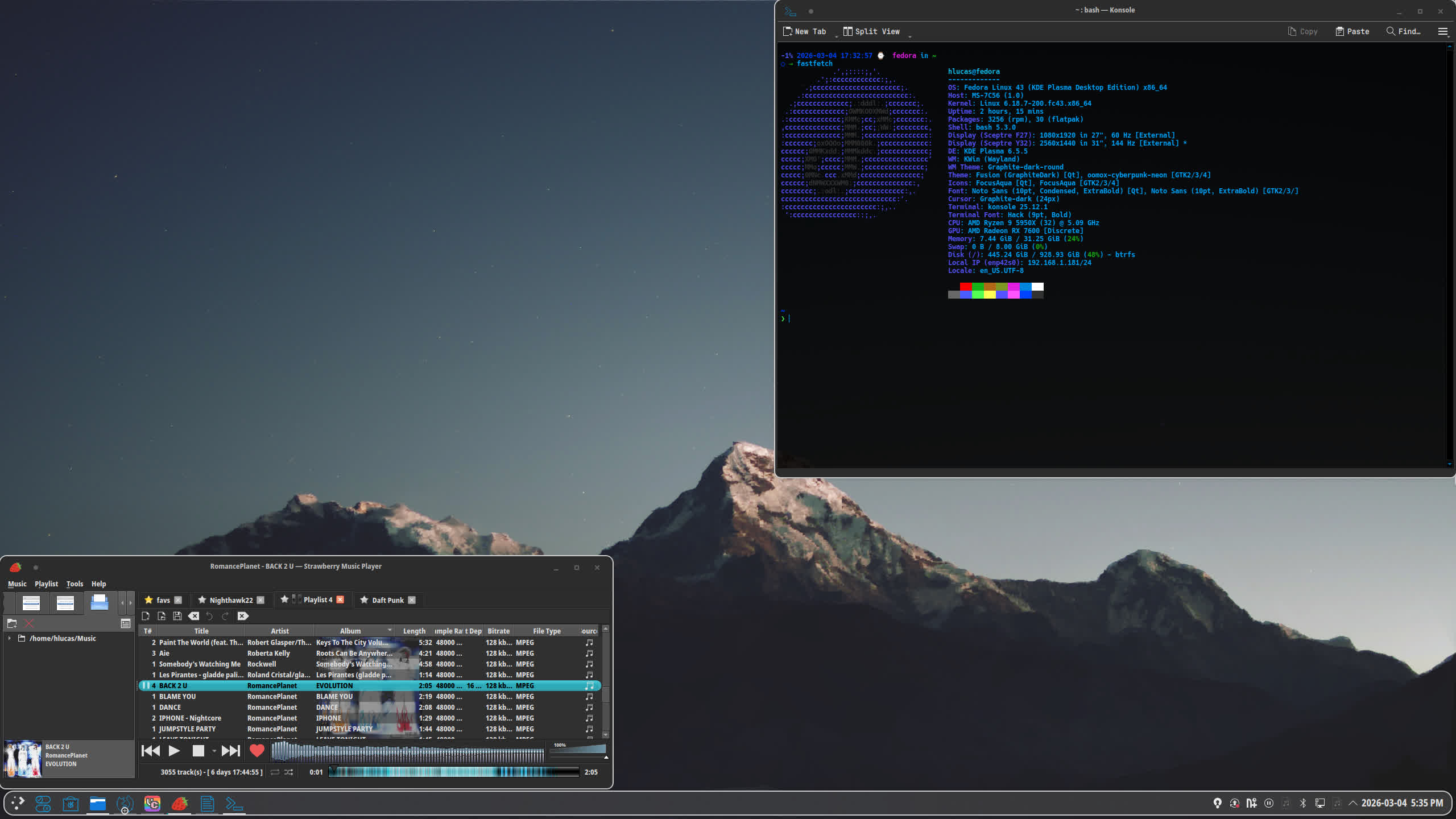
Why I dropped the Windows 7 look
The Win7 theme was a novelty. The Aero glass, the taskbar, the specific shade of blue it worked for a while and I liked the irony of running it on Fedora. But after a few months it started feeling more like a costume than an actual environment. The feel was too heavy the colours too bright and anything outside of the GTK theme looked completely out of place.
I wanted something that still had a retro edge but was easier to work in for long sessions. Graphite aqua fits that. Dark base muted greys for window chrome and panels with a sharp aqua used selectively for accents active window borders selected items highlighted text. It reads clearly without demanding attention.
What changed
- Colors: Dropped the Aero blue. Window chrome is now near black. Aqua (#00B4C5 range) is used only for active states not decoratively.
- Window borders: Thinner. The Win7 borders were chunky and reflective. These are flat with a 1px accent on the active window.
- Icons: Replaced the legacy icon set. Using a flat icon theme that fits the darker palette without looking like a stock GNOME install.
- Overall feel: Less nostalgic more functional. Feels like something from the late 10-20s UNIX workstation era rather than a Windows emulation.
The Pi couldn't handle gigabit
The OpenWRT setup on the Raspberry Pi 4B is gone. It ran fine at lower speeds but once I was pushing close to gigabit throughput it fell apart. Packet loss, dropped connections, the thing would just stop routing and need a reboot. I had a watchdog script that restarted it when it couldn't ping an AP that masked the problem for a while but didn't fix anything.
The core issue is hardware. The Pi 4's USB 3.0 bus and the USB NIC I was using share bandwidth. Under sustained load you hit a ceiling fast. There's no offloading no hardware NAT, no dedicated switching fabric it's a single-board computer doing a job it wasn't designed for at that throughput.
- Sustained gigabit throughput consistently caused routing to hang
- No hardware NAT acceleration on the Pi means everything goes through the CPU(it did NOT like that)
- Troubleshooting confirmed the instability was hardware not config
What changed on the site
The site got a full visual rebuild. The original version used a fixed orange container on a dark red background it was personal and distinctive but structurally messy. Inconsistent nav across pages unclosed tags inline styles scattered everywhere.
The new version is a proper aesthetic dark background monospace type throughout consistent layout system with CSS variables. Every page uses the same header nav and footer structure. No more drift between pages.
- CSS variables for the full colour system one place to change anything
- Consistent nav and header across all pages including project subpages
- Specs presented in tables instead of bullet lists easier to scan
- Removed all inline styles and consolidated into
style.css - Music player rebuilt with tracklist shuffle and auto advance
- Meme carousel counter added
No-JS compatibility
Some users run privacy-hardened browsers with JavaScript disabled. The original site depended on JS for the meme carousel, the music player, and the blinking cursor. For static content pages like this one there is little to no JavaScript.
The rest of the site still uses JS for the music player and some meme features those lowkey need it to function. But static content pages like this one have no reason to require scripting. If you're reading this with JS off everything here should work exactly as intended.