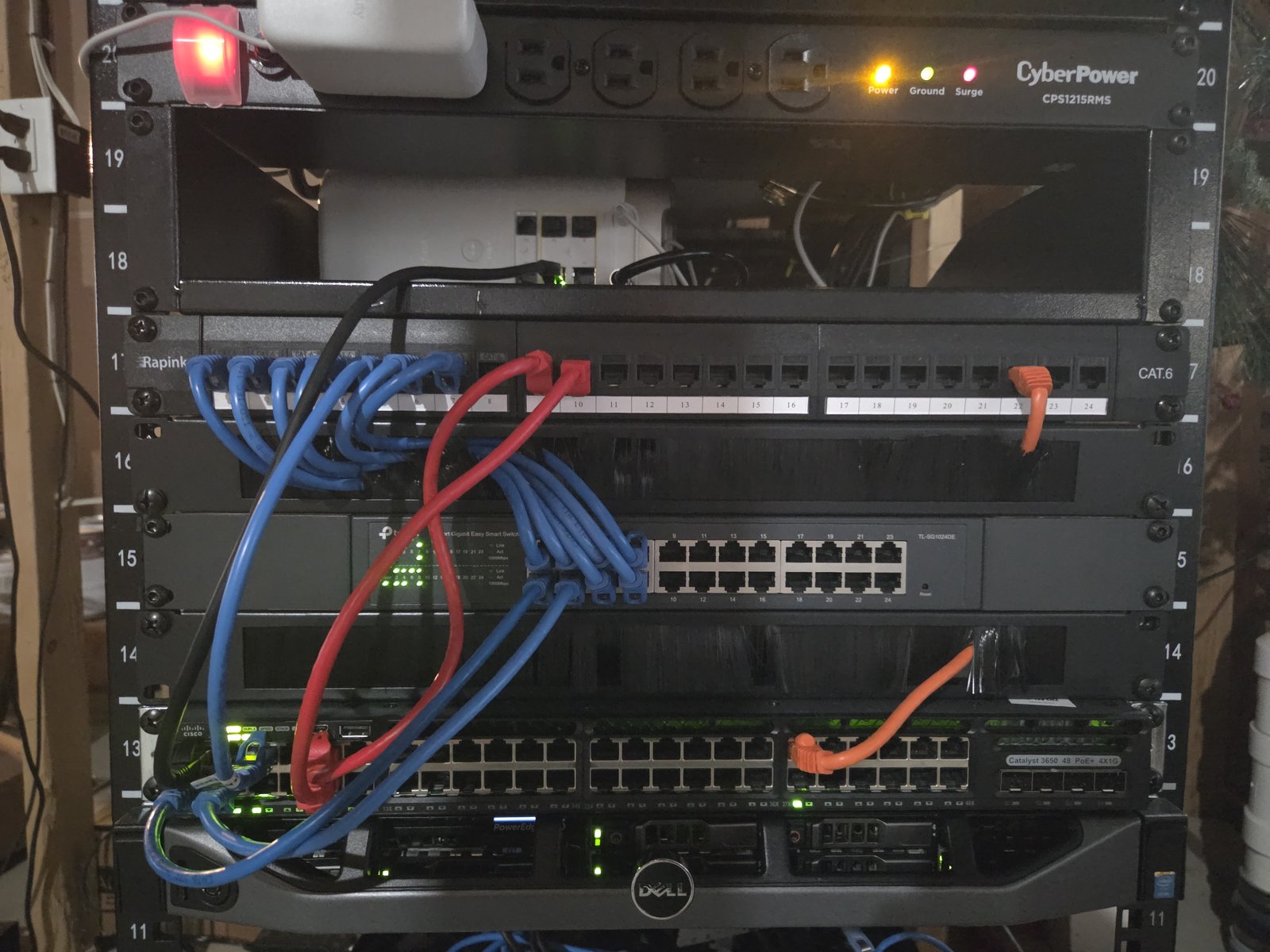
Everything hangs off one managed switch now
My network had grown the way these things do — a cheap switch here, a cable run through a wall there, nothing documented. I pulled it apart and rebuilt it around a proper managed switch, re-cabled the whole thing, then spent the back half of the project locking it down.
Three pieces of hardware carry the whole network:
- Cisco Catalyst WS-C3650-48PS — 48-port PoE layer 3 switch running IOS-XE 16.x. This is the core. Everything plugs into it.
- TP-Link TL-SG1024DE — a 24-port smart switch hanging off the Cisco, feeding the wireless APs and the wall drops.
- Xfinity XB8 (Technicolor CGM4981COM) — the ISP gateway, running in router mode. It does NAT and DHCP for the whole house.
The Catalyst is enterprise gear that shows up cheap secondhand, and for a home network it is enormous overkill in the best way — PoE on every port, real logging, and switching features consumer hardware simply does not expose.
The tradeoff I couldn't design around
I went into this wanting VLANs. The plan was four segments — gaming, servers, IoT, and management — so that a compromised smart plug couldn't see my NAS, and so management traffic lived somewhere separate from everything else. That is the whole reason you buy a managed switch.
I couldn't do it, and the reason is worth explaining because it isn't obvious until you hit it.
- The Catalyst 3650 is a layer 3 switch, so it can happily route between my own subnets. What it cannot do is NAT. Nothing in the 3650 translates a private address into my one public address.
- The Xfinity gateway does NAT — but it will only ever NAT the single subnet it hands out itself. It has no field for static routes, so it has no way to learn that other subnets exist behind the switch.
Put those together and you get a network that half works. Extra subnets could reach each other through the switch, but any packet heading for the internet would reach the gateway, get translated, and then the reply would come back with the gateway having no idea how to return it to a subnet it has never heard of. Traffic goes out and dies.
So the network is deliberately flat — one subnet, everything on it. Not because I ran out of patience, but because with no NAT-capable device between the gateway and the switch, flat is the only topology that actually reaches the internet. Segmentation isn't a switch feature I forgot to turn on; it needs a router I don't own yet.
How it's actually wired
The port assignments, since the diagram gets small on a phone:
| PORT 1 | Uplink to the Xfinity gateway — the only way out |
| PORTS 2 + 4 | Two-link static LAG (EtherChannel) to the TP-Link switch |
| PORT 5 | Gaming room — PC, an access point, and a small unmanaged switch |
| PORTS 9 + 10 | Servers — the NAS and the box this website runs on |
| PORT 37 | Server out-of-band management (iDRAC) |
| EVERYTHING ELSE | Administratively shut |
The LAG is the one bit of real design in here. Bonding ports 2 and 4 into a single logical link gives the APs and wall drops more aggregate bandwidth than one cable, and means a bad cable or a dead port drops throughput instead of dropping half the house off the network.
Locked out, then a broadcast storm
I had lost every login for the switch. No password, no recovery, no notes — so before I could configure anything I had to plug a laptop straight into the switch's console port and get in that way. Not a hard problem, but it is a humbling way to start a project, and it is the reason the credentials now live somewhere I will actually find them again.
Then I took the network down with a bridging loop. Bringing up the LAG, I cabled and configured the Cisco side first and assumed the TP-Link would follow. It didn't — its static LAG config hadn't fully applied. So for a window there were two live cables between the two switches with nothing bundling them into one logical link, which is simply a loop. Broadcast traffic went round and round and multiplied, and the network fell over.
The logs made it obvious what was happening. I pulled one of the two cables to break the loop immediately, finished and confirmed the LAG configuration on the TP-Link side, and only then brought the second link back up. Clean on the second attempt.
Closing the doors on the switch
- SSH only. Telnet disabled outright — it sends credentials in plaintext and has no business existing on a modern network.
- Web UI off. The HTTP management interface is disabled. It's another listening service I never use, so it's another way in for nothing.
- DHCP snooping. Only the gateway port is trusted to hand out addresses. Anything else that starts offering DHCP — a misconfigured router someone plugs in, or something malicious — gets its offers dropped instead of quietly hijacking the network.
- BPDU guard on host-facing ports. If a device on one of those ports starts talking spanning-tree, it shouldn't be there, and the port shuts itself down rather than letting it influence the topology.
- Broadcast storm-control. Directly informed by the loop above — a port that starts screaming broadcast traffic now gets throttled automatically instead of taking everything down with it.
- Strong, non-default credentials, and every unused port administratively shut. An open port in a wall is an open port.
And on the gateway
- Firewall set to Typical, with no port forwards and no DMZ host — nothing inbound is exposed.
- WPS off. It's a known-weak way into a wireless network and I have no use for it.
- The public "xfinitywifi" hotspot off, so my gateway stops broadcasting an open network for strangers.
- Remote management off.
- Audited every connected device on the network and confirmed I could account for all of them.
A UPS, then the router that unlocks VLANs
A UPS is first, and it's not really optional. The switch has been power-cycling every time the power blips, which takes the whole network with it — and a NAS losing power mid-write is a much more expensive problem than a rebooted switch. That one purchase fixes the most common failure I actually experience.
After that, the NAT-capable router. That's the piece that turns everything in section 02 from a constraint into a plan: gaming, servers, IoT and management each on their own VLAN, with the Catalyst finally doing what I bought it to do. The cabling and the switch config are already built for it — the segmentation is the only part waiting on hardware.
The messier history of how the network got here, including the Pi router experiment that didn't survive, is over on the router upgrades page.